Arc#
A real arc can also be created using a group of base points, in which case the straight type should be used.
The arc type provides a parametric way to build this type of base line, then PreVABS will
discretize it.
There are several ways of defining an arc.

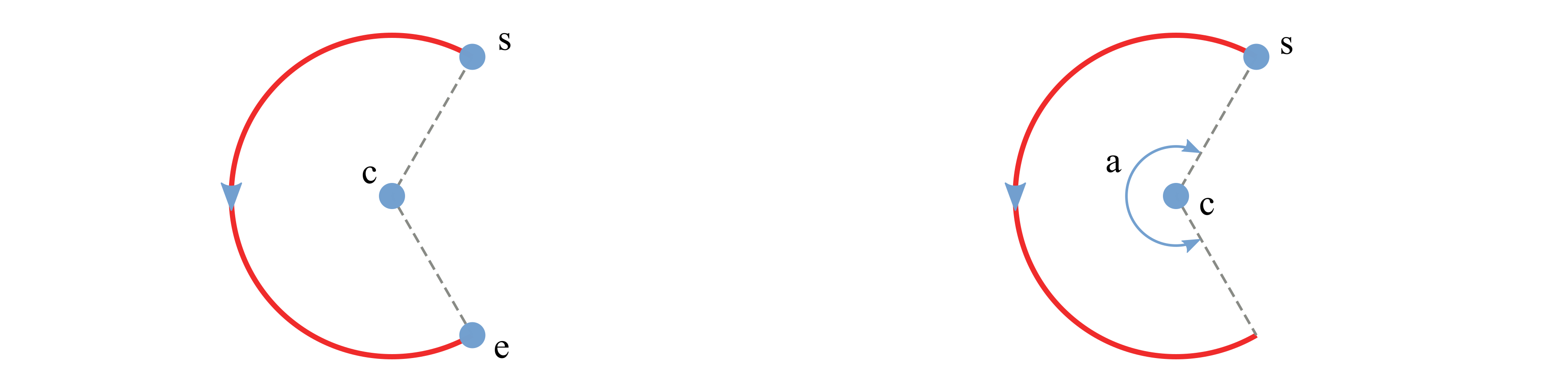
Use center, starting point, ending point and direction.
Use center, starting point, ending point and angle.
Use center, starting point, angle and direction.
Use starting point, ending point, and either
<radius>or<curvature>, with an optional<side>to choose which side of the chord the arc bends toward. A zero curvature degenerates to a straight chord.
Example inputs:
<baselines>
    ...
    <line name="left" type="arc">
        <center> c </center>
        <start> s </start>
        <end> e </end>
        <direction> ccw </direction>
        <discrete by="angle"> 9 </discrete>
    </line>

    <line name="right" type="arc">
        <center> c </center>
        <start> s </start>
        <angle> a </angle>
        <discrete by="number"> 10 </discrete>
    </line>

    <line name="by_radius" type="arc">
        <start> s </start>
        <end> e </end>
        <radius> r </radius>
        <side> right </side>
        <direction> ccw </direction>
    </line>
    ...
</baselines>
Specification
<center>Name of the center point.
<start>Name of the starting point.
<end>Name of the ending point.
<direction>Direction of the circular arc. Choose from ‘cw’ (clockwise) and ‘ccw’ (counter-clockwise). Default is ‘ccw’.
<angle>Central angle of the arc.
<radius>/<curvature>Used together with
<start>and<end>to size the arc; provide one or the other.<side>leftorrightof the chord (start→end). Default isright.<discrete>Number of discretization. If
by="angle", then new points are created every specified degrees of angle. Ifby="number", then specified number of new points are created and evenly distributed on the arc.byChoose one from
angleandnumber. Default isangle.
Circle#
Defining a circle is simpler than an arc.
User only need to provide a center with radius or another point on the circle.
The corresponding element tags are <center>, <radius> and <point>.
There are two ways of defining a circle:
Use center and radius.
Use center and a point on the circle.
A sample input file demonstrating the two methods:
<baselines>
    ...
    <line name="circle1" type="circle">
        <center> c </center>
        <radius> r </radius>
    </line>

    <line name="circle2" type="circle">
        <center> c </center>
        <point> p </point>
        <direction> cw </direction>
    </line>
    ...
</baselines>
Specification
<center>Name of the center point.
<radius>Radius of the circle.
<point>Name of a point on the circle.
<direction>Direction of the circle. Choose from
cw(clockwise) andccw(counter-clockwise). Default isccw.<discrete>Number of discretization (same semantics as for arcs).