Batch Cross-sectional Analyses
How to drive PreVABS and VABS over a batch of airfoils for beam property studies
Overview
This example demonstrates how to drive PreVABS and VABS in batch mode to compute Timoshenko beam properties for many airfoil cross-sections. Each case generates an airfoil cross-section from a Selig-format coordinate file, applies a chosen material and layup, and runs PreVABS/VABS to produce sectional stiffness and inertia properties.
Highlights
Run cross-sectional analyses on 1600+ airfoils
Start from standard Selig-format airfoil coordinate files
Reuse one PreVABS template across different materials and layup angles
Extract sectional properties from VABS output using APIs of sgio
Problem Setup
Cross-Section and Layup
Airfoil data are downloaded from UIUC airfoil coordinates database.
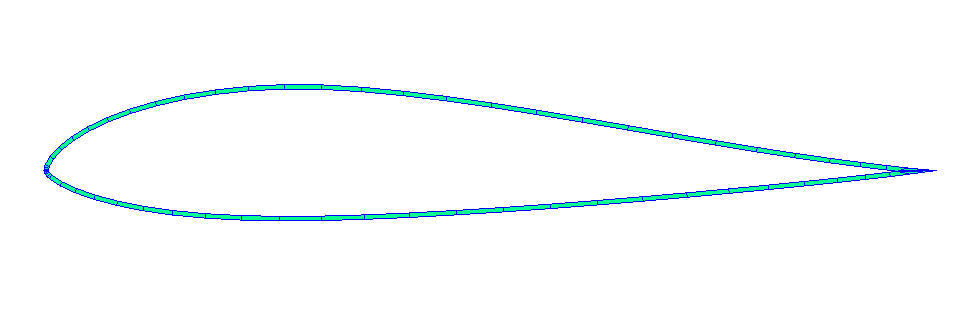
Each cross-section is an airfoil contour with a single skin layup of fixed thickness wrapped around the entire surface. The fiber angle of the skin lamina is set per configuration. The leading- and trailing-edge points used by PreVABS are derived from the camber line of the input coordinates.
Material Properties
All materials are defined in materials.xml.
Table 1:Materials
Material | , | , | |||
|---|---|---|---|---|---|
Aluminum alloy | 2780 | 71.0 | 0.33 | ||
Carbon/epoxy UD lamina | 1578 | 140.0 | 10.0 | 0.27 | 4.137 |
Results
Each batch run produces a CSV (e.g. skin_al_0001/results.csv) with one row per airfoil. The notebook plot.ipynb loads all result CSVs and renders an interactive scatter plot. Dropdown menus select which beam property is shown on the x and y axes and which airfoil to be highlighted, and legend entries toggle individual datasets on or off.
Open the interactive plot in a new tab
Beam properties for different airfoils and materials.
The user can select which properties to plot on the x and y axes using the dropdown menus, choose an airfoil name to highlight across datasets, and toggle datasets on or off by clicking legend entries.
Beam model refs:
https://
www .sciencedirect .com /science /article /pii /S0263822324008183 https://
wenbinyugroup .github .io /sgio /guide /model /bm _timoshenko .html
Technical Details
Run This Example
Prerequisites
Standalone executables
Python dependencies
Install dependencies:
# Install only this example's dependencies
cd examples/airfoil_cross_sections
uv sync --extra notebook --extra plotting
Run configurations
# Run one batch configuration
uv run python run.py config_skin_al_0001.json
# Results are written to skin_al_0001/results.csv
# Per-case files are written under skin_al_0001/evals/

uv run python run.py config_skin_cfrp_0001.json
uv run python run.py config_skin_cfrp_0001_45.json
Analysis Workflow Scripting
The scripting is organized around two practical tasks:
Pre-processing: convert a standard airfoil coordinate file plus a shared PreVABS template into the VABS input files for one case.
Post-processing: read the generated VABS output and extract a small set of beam properties into a flat table.
The batch driver in run.py mainly orchestrates these two steps repeatedly across many airfoils.
1. Pre-Processing: Airfoil Coordinates -> VABS Input
The per-case workflow in main.py starts from a standard Selig-format airfoil file and a reusable PreVABS XML template, airfoil_skin_only.template.xml.
For each case, the script:
Reads the airfoil coordinates.
Infers the original decimal precision and reconstructs a clean Selig-format copy for the case directory.
Computes the leading- and trailing-edge reference points from the camber line at normalized chord locations
x=0andx=1.Fills those values, together with mesh/material/layup parameters, into the PreVABS template.
Runs
prevabsto generate the structure-genome file (.sg), then runsvabson that.sgfile.
A simplified version of the geometry preparation step is:
def process_airfoil_data(airfoil_file):
    x_precision, y_precision = infer_coordinate_precision(airfoil_file)
    upper_raw, lower_raw = fileio.import_airfoil_data(str(airfoil_file))
    airfoil = airfoils.Airfoil(upper_raw, lower_raw)

    le_point = (0.0, round_with_precision(float(airfoil.camber_line(0.0)), y_precision))
    te_point = (1.0, round_with_precision(float(airfoil.camber_line(1.0)), y_precision))

    return ProcessedAirfoilData(
        title=...,
        upper=...,
        lower=...,
        x_precision=x_precision,
        y_precision=y_precision,
        le_point=le_point,
        te_point=te_point,
    )
Those processed coordinates are then written back out in Selig format and injected into the XML template:
processed_airfoil = process_airfoil_data(airfoil_path)
copied_airfoil = working_path / airfoil_path.name
export_selig_airfoil_file(copied_airfoil, processed_airfoil)

template_context = build_template_context(
    airfoil_filename=copied_airfoil.name,
    processed_airfoil=processed_airfoil,
    material_filename="materials.xml",
    template_params=template_params,
)
prevabs_input_text = render_prevabs_input(template_text, template_context)
(working_path / "airfoil_cs.xml").write_text(prevabs_input_text, encoding="utf-8")

await run_solver_command(["prevabs", "-i", "airfoil_cs.xml", "--hm"], ...)
await run_solver_command(["vabs", "airfoil_cs.sg"], ...)
The shared PreVABS template is intentionally generic. The airfoil-specific data enter through only a few placeholders:
<line name="ln_af" type="airfoil">
  <points data="file" format="1" header="1">{airfoil_file}</points>
  <leading_edge>{le_x} {le_y}</leading_edge>
  <trailing_edge>{te_x} {te_y}</trailing_edge>
</line>

<lamina name="ply">
  <material>{material_name}</material>
  <thickness>{lamina_thickness}</thickness>
</lamina>

<layer lamina="ply">{fiber_angle}</layer>
See PreVABS documentation to build your own templates.
In other words, the front end of the workflow is mostly template binding: a standard airfoil file provides the boundary coordinates, the script derives the LE/TE reference points required by PreVABS, and the template contributes the fixed modeling choices.
2. Post-Processing: VABS Output -> Section Properties
Once vabs finishes, each case has an output file such as airfoil_cs.sg.k. The post-processing step in post_process.py is deliberately small: it parses that file with sgio and asks for a predefined list of property names such as mu, ea, gj, ei22, and ei33.
The core read step is:
model = sgio.read_output_model(
    str(vabs_output_path),
    file_format="vabs",
    model_type="BM2",
)
Property extraction is then just a thin wrapper around model.get(...):
def extract_properties(model, property_names):
    available_names = {name.lower() for name in model.getAll().keys()}
    extracted = {}

    for property_name in property_names:
        extracted[property_name] = model.get(property_name)

    return extracted
This separation is useful in practice: once the expensive solver run has completed, you can re-extract a different set of section properties from the same .sg.k file without regenerating the mesh or rerunning PreVABS/VABS.
The batch script run.py simply calls this post-processing function after each successful case and appends the resulting dictionary as one row in the output CSV.
Reference
Configuration
run.py supports loading a JSON config file such as config_skin_al_0001.json.
Relative paths inside the config file are resolved relative to the config file location.
{
  // Directory containing candidate airfoil coordinate files.
  "airfoil_dir": "coord_seligFmt",

  // Root output directory for per-airfoil case folders and logs.
  "working_dir": "skin_al_0001/evals",

  // Optional explicit subset of airfoil files to run.
  // Use null to run all files under airfoil_dir.
  "airfoil_files": null,

  // Optional random sample size from the selected airfoils.
  "sample_size": null,

  // Random seed used when sample_size is not null.
  "seed": 0,

  // Number of airfoil cases to run concurrently.
  "jobs": 10,

  // Optional timeout in seconds for each prevabs/vabs command.
  "solver_timeout": 10,

  // Failure policy: "continue" records a failed case and moves on;
  // "stop" aborts the whole batch on the first failure.
  "failed_case": "continue",

  // Section properties to extract from the VABS output.
  "properties": [
    "mu",
    "ea", "gj", "ga22", "ga33", "ei22", "ei33",
    "cmp12r", "cmp13r", "cmp14r", "cmp15r", "cmp16r",
    "cmp23r", "cmp24r", "cmp25r", "cmp26r",
    "cmp34r", "cmp35r", "cmp36r",
    "cmp45r", "cmp46r",
    "cmp56r",
    "tc2", "tc3", "sc2", "sc3"
  ],

  // Output CSV path. When running from a config file, a relative path is
  // resolved next to the config file rather than under working_dir.
  "output_csv": "skin_al_0001/results.csv",

  // Optional material database copied into each case directory.
  "material_file": "data/materials.xml",

  // PreVABS XML template used for each case.
  "template_file": "data/airfoil_skin_only.template.xml",

  // Extra template placeholders. These override main.py defaults.
  "template_params": {
    "mesh_size": 0.0025,
    "element_shape": "tri",
    "element_type": "linear",
    "translate_x": -0.25,
    "translate_y": 0.0,
    "scale": 1.0,
    "material_name": "al_alloy",
    "lamina_thickness": 0.001,
    "fiber_angle": 0.0
  }
}
Files
Scripts
run.py: Batch driver (CLI + JSON config)main.py: Single-case workflowpre_process.py: VABS input generatingpost_process.py: VABS output parsinghelpers.py: Path, logging, and solver utilitiesplot.ipynb: Result visualization
Data
materials.xml: Material databaseairfoil_skin_only.template.xml: PreVABS XML templateconfig_skin_al_0001.json: Aluminum caseconfig_skin_cfrp_0001.json: CFRP 0 deg caseconfig_skin_cfrp_0001_45.json: CFRP 45 deg case