SGIO#
SGIO#
Structure Gene (SG) I/O
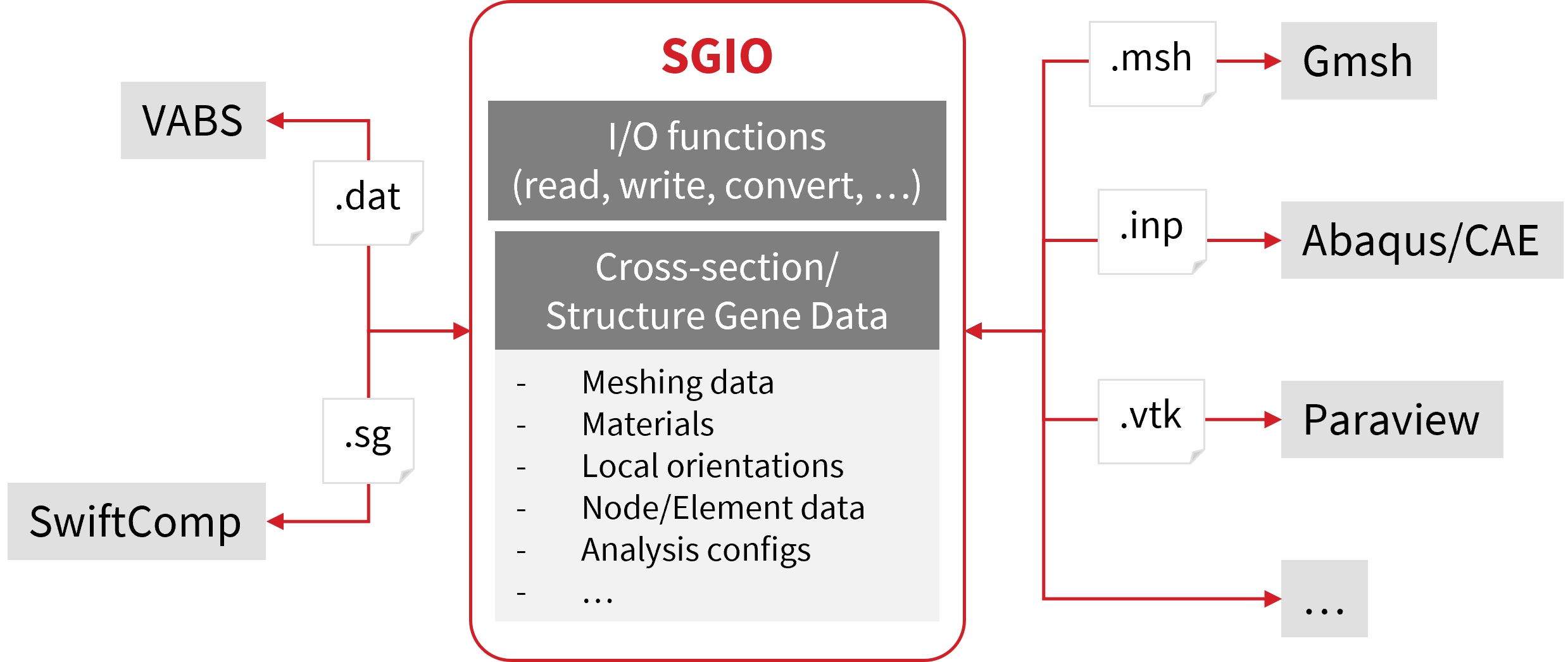
Python package interfacing VABS and SwiftComp. The package is developed based on meshio, which is used for converting meshing data.
Features#
The package can be used to:
Read/write SG data from/to different formats
Convert SG/mesh data between different formats
Read structural properties (effective models) from VABS/SwiftComp output
Read local states (strain/stress/failure) from VABS/SwiftComp output
Read generic finite element models (
sgio.read_fe_model) for multiscale workflowsMerge cross-sections along a span into a single visualization mesh
Plot cross-sections and stiffness matrices (matplotlib / plotly / PyVista)
Create 1D SG from layup input
Supported Data Formats
For complete SG data:
VABS, SwiftComp, Abaqus, Gmsh (through an SG manifest)
For mesh data only:
All formats supported by meshio
A structure gene (SG) is defined as the smallest mathematical building block of a structure.[1] A cross-section (CS) is a type of 2D SG.
Online documentation
Installation#
Requires Python >= 3.9.
Option 1: Install via pip (Recommended)#
pip install sgio
The 3D mesh preview and ParaView export helpers need PyVista, which is an optional dependency:
pip install sgio[pyvista]
Option 2: Install from Source#
git clone https://github.com/wenbinyugroup/sgio.git
cd sgio
pip install -e .
Or, using uv:
uv sync
Usage#
API#
Example: Read Beam Properties from VABS Output File#
import sgio

model = sgio.read_output_model('my_cross_section.sg.K', 'vabs', 'BM1')

print(model.ea, model.ei22, model.ei33, model.gj)
Example: Convert a Cross-Section from Abaqus to VABS#
import sgio

sgio.convert(
    file_name_in='cross-section.inp',
    file_name_out='cross-section.sg',
    file_format_in='abaqus',
    file_format_out='vabs',
    sgdim=2,
    model_type='BM2',
    model_space='xy',
)
Example: Convert a 3D Textile SG from Abaqus to SwiftComp#
import sgio

sgio.convert(
    file_name_in='plain_weave.inp',
    file_name_out='plain_weave.sc',
    file_format_in='abaqus',
    file_format_out='sc',
    sgdim=3,
    model_type='SD1',
    physics='thermoelastic',
)
SwiftComp’s omega is computed from the SG bounding box; pass omega=... to
sgio.read, sgio.write or sgio.convert to give it by hand.
Command Line Interface#
Example: Convert Cross-Sectional Data from Abaqus (.inp) to VABS Input#
Suppose a cross-section has been built in Abaqus (in the x-y plane) and output
to cross-section.inp.
To convert the data to the VABS input (Timoshenko model) cross-section.sg:
python -m sgio convert cross-section.inp cross-section.sg -ff abaqus -tf vabs -d 2 -m bm2 -ms xy
Example: Convert a 3D SG from Abaqus to a Thermoelastic SwiftComp Input#
python -m sgio convert plain_weave.inp plain_weave.sc -ff abaqus -tf sc -d 3 -m sd1 -p thermoelastic
Add --omega <value> to override the omega computed from the bounding box.
Complete Options#
usage: sgio [-h] [-v] {build,b,convert,c} ...

I/O library for VABS (cross-section) and SwiftComp (structural gene)

positional arguments:
  {build,b,convert,c}   Available sub-commands.
    build (b)           Build 1D structural gene.
    convert (c)         Convert CS/SG data file.

options:
  -h, --help            show this help message and exit
  -v, --version         Show version number and exit.
Convert SG Data#
usage: sgio convert [-h] [--loglevelcmd {debug,info,warning,error,critical}]
                    [--loglevelfile {debug,info,warning,error,critical}]
                    [--logfile LOGFILE] [-ff FROM_FORMAT]
                    [-ffv FROM_FORMAT_VERSION] [-tf TO_FORMAT]
                    [-tfv TO_FORMAT_VERSION] [-a {h,d,fi}] [-d {1,2,3}]
                    [-ms {x,y,z,xy,yz,zx}] [-mry {x,y,z}]
                    [-m {sd1,pl1,pl2,bm1,bm2}] [-p {elastic,thermoelastic}]
                    [--omega OMEGA] [-mo]
                    input_file output_file

positional arguments:
  input_file            CS/SG file to be read from.
  output_file           CS/SG file to be written to.

options:
  -h, --help            show this help message and exit
  --loglevelcmd {debug,info,warning,error,critical}
                        Command line logging level.
  --loglevelfile {debug,info,warning,error,critical}
                        File logging level.
  --logfile LOGFILE     Logging file name.
  -ff, --from-format FROM_FORMAT
                        CS/SG file format to be read from.
  -ffv, --from-format-version FROM_FORMAT_VERSION
                        CS/SG file format version to be read from.
  -tf, --to-format TO_FORMAT
                        CS/SG file format to be written to.
  -tfv, --to-format-version TO_FORMAT_VERSION
                        CS/SG file format version to be written to.
  -a, --analysis {h,d,fi}
                        Analysis type (h=homogenization, d=dehomogenization,
                        fi=failure).
  -d, --sgdim {1,2,3}   SG dimension (required for Abaqus input).
  -ms, --model-space {x,y,z,xy,yz,zx}
                        Mapping from input mesh axes to SG axes (required for
                        1D/2D Abaqus/Gmsh input).
  -mry, --material-ref-y {x,y,z}
                        Axis used as the material reference y-axis.
  -m, --model {sd1,pl1,pl2,bm1,bm2}
                        CS/SG model type (required for Abaqus/SwiftComp
                        input).
  -p, --physics {elastic,thermoelastic}
                        Physics included in the analysis (default: keep the
                        input file setting).
  --omega OMEGA         SG measure written to SwiftComp output (default: the
                        input file value, else the mesh bounding box).
  -mo, --mesh-only      Mesh only conversion.
Note: Node and element numbering is adjusted automatically to meet the requirements of the target format.
Build 1D SG#
usage: sgio build [-h] [--loglevelcmd {debug,info,warning,error,critical}]
                  [--loglevelfile {debug,info,warning,error,critical}]
                  [--logfile LOGFILE]
                  inputfile

positional arguments:
  inputfile             1D SG design input file.
Check out the example examples/convert_abaqus_cs_to_vabs for more details.
License#
This project is licensed under the MIT License. See the LICENSE file for details.